Showing posts with label Vulnerability Assessment. Show all posts

Wednesday, February 8, 2012

SHODAN THE AMAZING SEARCH ENGINE

SHODAN is a search engine that lets you find specific computers (routers, servers, etc.) using a variety of filters. Some have also described it as a public port scan directory or a search engine of banners.
SHODAN also lets you use boolean operators (‘+’, ‘-’ and ‘|’) to include/ exclude certain terms. By default, every search term has a ‘+’ operator assigned to it.
In addition to boolean operators, there are special filters to narrow down the search results.

SHODAN queries related to vulnerable servers, systems, and applications. To use shodan you must register your account at www.shodanhq.com      
Some also describe it as a container scanner search engine directories or banners, Shodan index most of the data taken from the 'banner', which is the meta-data server sends back to the client. It can be information about the server software, which supports the choice of services, a welcome message or any of the clients want to know before interacting with the server.

Tuesday, February 7, 2012

SQL INJECTION and BLIND SQL INJECTION

SQL Injection is often used to attack the security of a website by inputting SQL statements in a web form to get a badly designed website to perform operations on the database (often to dump the database content to the attacker) other than the usual operations as intended by the designer.(wikipedia). SQL injection is technique that exploits and attack vulnerability from the web application security. Commands, sql statement and query embeded SQL is used to penetration test the vulnerability to injected web form into the database, change data or dump the database.

The following line of code illustrates this vulnerability
statement = "SELECT * FROM users WHERE name = '" + userName + "';"
This SQL code is designed to pull up the records of the specified username from its table of users. However, if the "userName" variable is crafted in a specific way by a malicious user, the SQL statement may do more than the code author intended.
' or '1'='1
Or using comments to even block the rest of the query (there are three types of SQL comments, you can  
SQL injection is used to :
  • Perform operations on the database
  • Bypass authentication mechanisms 
  • Read otherwise unavailable information from the database
  • Write information such as new user accounts to the database
Three forms of SQL injections :
  • Redirection and reshaping a query
  • Error message based
  • Blind injection
BLIND SQL injection
Blind SQL Injection is one of the database exploitation techniques that are different from sql injection in which the normal value will be issued but a blind sql injection techniques will not issue any value but the value that we will find out by trial and error will value the test true or false value, Here we use the command
mid () = almost the same function as substring ()
char () = is a variable of character

To test a bug (vulnerable) :
Sql injection :
By inserting the statements  "and 1=0 dan and 1=1"
www.victim.com/client.php?id=3 and 1=0
www.victim.com/client.php?id=3 and 1=1  
maybe have vuln....

Blind sql injection :
Using query: "and mid (user (), 1,1) = CHAR (65)"
mid (user () 1,1) = in this case we do not know the value, so we try and try of what the value of user "()" we try empty and 1.1 points behind () is that while the sequence of CHAR value is in decimal and variables (65) is the decimal value. in the ASCII table 65 is A.

www.victim.com/client.php?id=3and mid(user(),1,1)=CHAR(65)  if with the statement we have false we must try other statment by change the value until we have the true.


Thursday, February 2, 2012

HOW TO EXPLOIT WINDOWS USING METASPLOIT

Day 4 

Exploitation Windows XP Using Metasploit

Today learning how to use metasploit to exploit windows xp sp 3 in my virtual lab for penetration testing. In this sessions, step by step from Informations Gathering, Servce Enumeration, Vulnerability Assessment and now we can try to exploit the victim.
First step with known of the vulnerability from target :

Ip Address
 Lets see by nessus vulnerability scanner we can get the vulner from victim :

Vulnerability
Open Port
Services Vulnerability
Can you see the service vulnerabilities, smb and windows server.
All information of vulnerabilities
Port and Vulnerabilities
In the picrture above we known vulnerability from windows xp, two hight risk of vulnerability by port 445 tcp and other port is medium and low risk vulnerabilities.

Ok, with the information of the vulner we can try to exploit with metasploit :
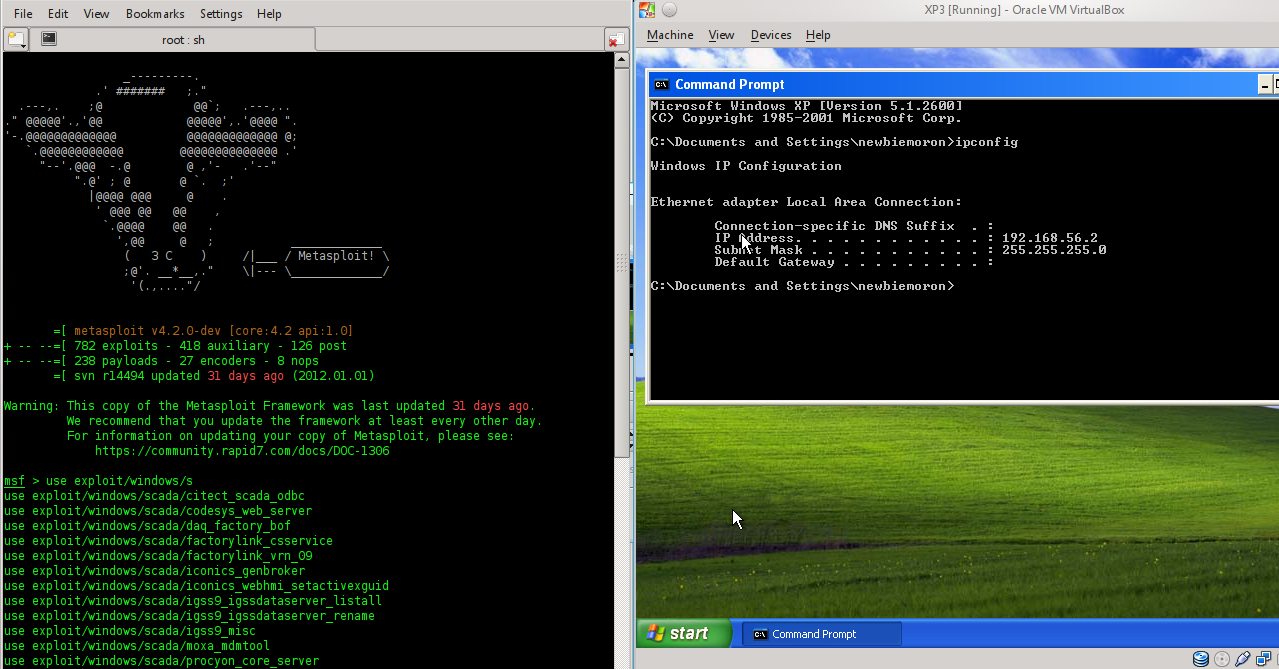
The picture showing ip address client and metasploit, in metasploit by using command like the picture with choosing service from windows. Next we by choossing the exploit and information of services vulnerabilities (smb). you can see  the description of the vuln.


In the picture i choose the smb service with hight risk, and penetration with set ip address oh attacker

Set payload to execute the victim,

The option and and set Ip Address the victim,
In the original you can see the 3 folders in the drive C:\ and i will to make one folder in this drive. Lets to exploit target.

Yaps, exploite successfull
Im in the windows environtman...show list of the folder in the drive..Lets to make a new directory with name newbiemoron (maybe www.newbiemoron.com my expire blog )

Its Funiest Day...Thank You MRP and IS2C


Wednesday, February 1, 2012

How To Install Nessus In Backtrack 5

Days 3
Today, from newbie and a cup of coffe i will be explain how to install Nessus is open source tool for identifying vulnerabilities both configurations error and software bugs, of which the former is more prevalent with network devices.

Open konsole and type this comand :
If the download installation success, next step you must be registration for adding new user. Add user by go to Menu > Vulnerability Assessment > Vulnerability Scanner > Nessus > Nessus Register
 
 
Go home for nessus home page and than you must be agree of the rule agreement for using nessus. After this session you must registration your mail address and go to cek email verivication code from nessus. I you are lucky and success registration lets copy your register code from nesus in the konsole like this.


After enter the registration code and please wait this session. Maybe you can see the process downloading by use bmon (Bandwidth Monitoring) to known the download activities.
 
 
If you are lucky boy you can see this picture, 
Next

 
And you must go to the browser, in this time i am using mozilla. Type localhost:8834 or 127.0.0.1:8834 to starting vulnerability assessment scanner (nessus).
 
 
Nessus is running and already to use....